

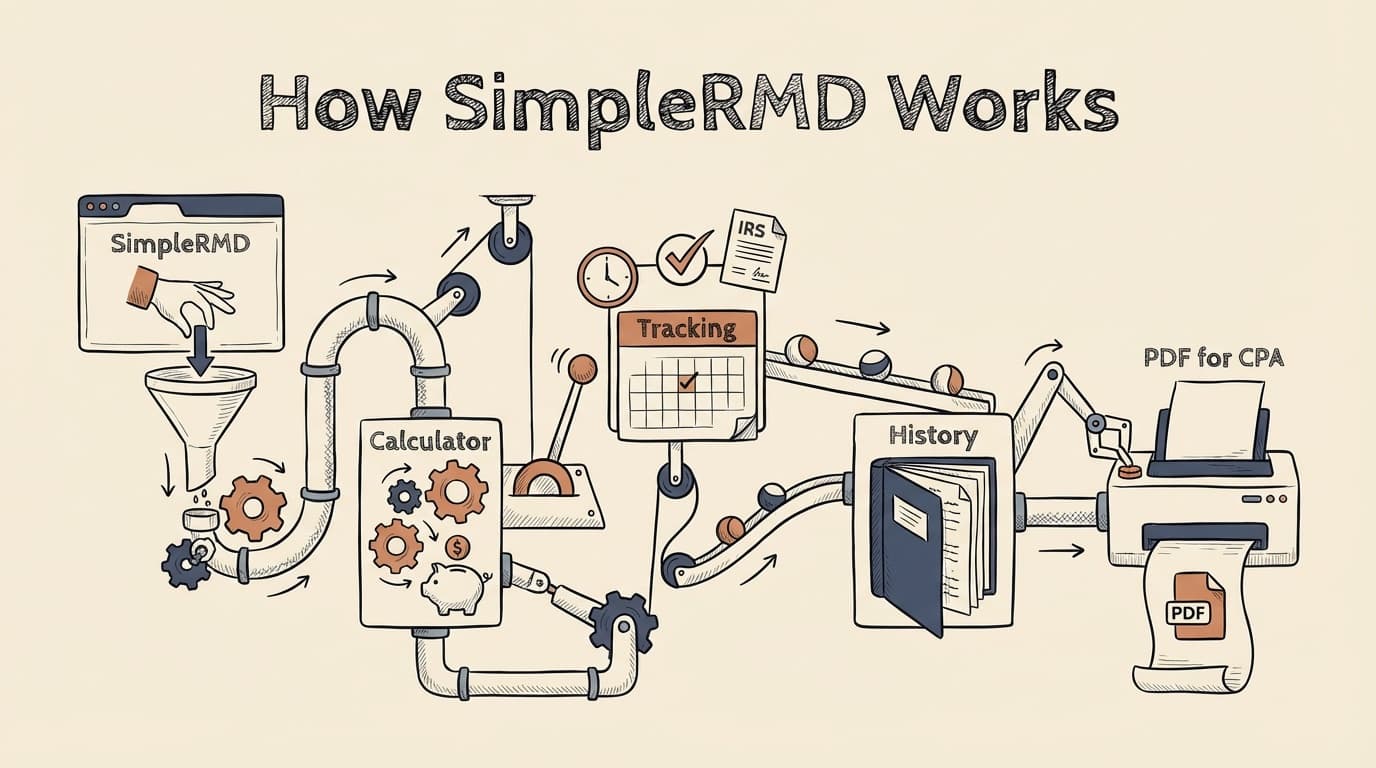
SimpleRMD helps you calculate Required Minimum Distributions, save the information you always have to re-enter, and reduce year-end stress.
- Uses IRS life expectancy tables and rule-based logic
- Saves your key inputs so you don't re-gather them every year
- Creates accountant-ready exports you can share or print
- Built by someone who's managed this process annually for over 15 years
Run the calculator — free, no account required · See a sample export
On this page
- What You'll Need
- What the Calculator Does
- What It's Based On
- Inherited IRAs: How We Handle Them
- What We Don't Do
- Data & Privacy
- Accountant Exports
- Reminders
- Frequently Asked Questions
What You'll Need
Most RMD frustration isn't the math — it's collecting the same details every year. Here's what you'll need to run a reliable calculation.
| Input | Standard IRA | Inherited IRA |
|---|---|---|
| Your date of birth | Used for life expectancy lookup | — |
| Original owner's date of birth | — | Used for life expectancy and timeline |
| Year of death | — | Determines which rules apply |
| Owner's RMD status at death | — | Changes whether annual distributions are required |
| Prior year-end balance (Dec. 31) | Per account | Per inherited account |
| Your start year | — | If applicable |
That's it for most standard IRA owners — just your date of birth and each account's year-end balance. If you have multiple IRAs, you'll enter a balance for each one — SimpleRMD handles the aggregation math automatically.
Inherited IRAs need more detail because small differences — especially the original owner's RMD status at death — can change the outcome significantly. If you're not sure about some of these inputs, our inherited IRA guide walks through each scenario.
If you create an account, SimpleRMD saves these inputs so you don't have to track them down again next year.
For a deeper look at what each input means and why it's needed, see: What information do I need for my RMD?
What the Calculator Does
SimpleRMD is designed to stay focused and clear:
- Calculates RMDs for common U.S. retirement account scenarios (Traditional, Rollover, SEP, and SIMPLE IRAs)
- Supports multiple accounts and aggregated RMD planning — enter each IRA separately, see the combined picture
- Handles inherited IRA logic, including 10-year rule timelines and annual distribution requirements
- Shows a clear summary of inputs and results, so you can see exactly how the number was reached
- Generates a PDF export you can share with your accountant — auditable, clean, ready to hand off
- Offers optional reminders so deadlines don't sneak up on you
The calculator runs for free with no account required. An account unlocks saved inputs, multi-year tracking, shared access, and exports.
Step-by-step flow showing how SimpleRMD works: enter your date of birth and account balances, select standard or inherited IRA scenario, view your RMD summary with aggregated totals, and export a PDF for your accountant
Related: Inherited IRA RMD rules · RMD deadlines and penalties · RMD rules by account type
What It's Based On
SimpleRMD uses published IRS tables and rule-based logic to produce a clear result. This section explains what the calculation depends on — because for something IRS-sensitive, "trust us" isn't good enough.
IRS Tables and Guidance
The calculator uses the IRS life expectancy tables published in Publication 590-B as the basis for all results:
- Uniform Lifetime Table — used for most original account owners. This is the standard table that applies unless your sole beneficiary is a spouse more than 10 years younger.
- Joint Life and Last Survivor Table — used when a much-younger spouse is the sole beneficiary.
- Single Life Expectancy Table — used for inherited IRA calculations, where the beneficiary's (or original owner's) life expectancy determines the annual distribution.
For inherited IRAs, the calculator applies scenario-based logic informed by the SECURE Act, SECURE 2.0 Act, and IRS Final Regulations (T.D. 10001, July 2024) to map timelines and required withdrawals.
The current life expectancy tables took effect in 2022 and have not been revised since. We confirm them against the most recent Publication 590-B each year.
If you want to see the actual tables and how the math works, see: RMD table explained · Is this calculator accurate?
Assumptions and Edge Cases
The calculator asks for specific inputs because small differences can change the outcome — especially for inherited IRAs, where the year of death, the original owner's RMD status, and the beneficiary's relationship to the owner all matter.
Simple RMD keeps the experience simple, but the logic is intentionally conservative. When there's ambiguity in how a rule should be applied, the calculator defaults to the interpretation that's least likely to leave you short.
How Updates Work
IRS guidance and enforcement can change — and for inherited IRAs in particular, it has changed meaningfully in recent years. When something material changes, we update the calculator logic and the related explanations across the site. The "last updated" date on each page reflects the most recent review.
Inherited IRAs: How We Handle Them
Inherited IRAs are one of the most confusing areas in the RMD world. The answer to "what do I owe?" depends on details that many people don't realize matter: the year the original owner died, whether they'd already started taking RMDs, and your relationship to them.
SimpleRMD asks a small set of questions to help place your situation into the right scenario and show the required withdrawals clearly. We don't ask you to figure out which rule applies — the calculator does that based on your inputs.
For the full picture on inherited IRA rules, timelines, and the 10-year depletion requirement, see our complete guide: Inherited IRA RMD rules · The 10-year rule explained
Run the inherited IRA calculator →
If inherited IRA rules or enforcement change — which is rare but has happened multiple times since 2020 — we update the calculator logic and email alert subscribers so no one is caught off guard.
Get rule-change alerts (inherited IRAs only)
We'll only email you if inherited IRA rules or enforcement materially change.
You can unsubscribe anytime.
What We Don't Do
SimpleRMD is a tool to help you calculate and organize RMD information. It is not a replacement for your tax professional.
- We do not provide tax, legal, or financial advice.
- We do not recommend specific withdrawal strategies.
- We do not execute withdrawals or move money for you.
- We do not connect to your brokerage accounts or access your funds.
- We do not replace your accountant, advisor, or custodian.
If you're unsure about your situation — especially when it comes to tax implications, inherited IRA timelines, or penalty corrections — we recommend sharing your SimpleRMD export with your tax professional. That's exactly what the export is designed for.
Data & Privacy
We keep this simple and conservative.
- What we store (with an account): The inputs you enter — account balances, dates, beneficiary details — so you don't have to re-enter them next year. Reminder preferences if you set them. Export history.
- What we don't store: We do not require or store brokerage credentials, Social Security numbers, or any financial account login information. The calculator runs on the numbers you type in.
- How we protect it: Data is encrypted in transit and at rest. We follow least-access principles and do not share your data with third parties.
No data selling. No hidden access.
Accountant Exports
One of the most common frustrations at tax time: your CPA asks for your RMD details, and you're scrambling to reconstruct what you calculated months ago. Simple RMD solves this with a clean, shareable PDF.
What the Export Includes
- Account list — every IRA you've entered, with account type and custodian
- Prior year-end balances — the December 31 balances used in the calculation
- Computed RMD amounts — for each account individually and the aggregated total
- Assumptions and table references — so your CPA can verify the math
- Date and time stamp — showing when the calculation was run
The export is designed to be auditable. Your accountant shouldn't have to take your word for the number — they should be able to see exactly how it was reached.
Preview of a SimpleRMD accountant export PDF showing account list, December 31 balances, computed RMD amounts, and calculation assumptions
Sample export: Shows inputs, calculated RMD amounts, and IRS table references — everything your CPA needs to verify the number.
Generate my export (account required)
Reminders
Many people feel fine in January and stressed in November. A single reminder helps prevent the year-end scramble — and the processing delays that can turn a tight deadline into a missed one.
With an account, you can set reminders for:
- A date you choose
- Quarterly check-ins throughout the year
- More frequent reminders as year-end approaches
Or skip the account entirely and just tell us to remind you in November.
Remind me in November
We'll send one reminder in November. No newsletters.
You can unsubscribe anytime.
Frequently Asked Questions
Do I need an account to use the calculator?
No. The calculator is free and requires no account, no signup, and no credit card. You can run a calculation right now. An account is only needed if you want to save inputs across years, share access with a spouse or advisor, create PDF exports, or set reminders.
Is the calculator accurate?
We base calculations on the same IRS life expectancy tables and published guidance that tax professionals use. The logic is rule-based, transparent, and updated when IRS rules change. We verify results against the IRS's own worksheets in Publication 590-B, and user feedback helps us catch anything we've missed. For a detailed look at our methodology and how we handle edge cases, see: Is this calculator accurate? · RMD table explained
Can one IRA distribution cover multiple IRAs?
In many cases, yes. If you have multiple Traditional, Rollover, SEP, or SIMPLE IRAs, the IRS allows you to calculate each account's RMD separately and take the total from any one or more of them. SimpleRMD shows this aggregated view automatically. Note: this does not apply to 401(k)s, which must each be taken separately. See aggregation rules →
What if I have both inherited and non-inherited accounts?
Simple RMD handles both. Standard IRA RMDs and inherited IRA distributions are calculated independently — they follow different tables and different rules. You'll enter each account separately, and the calculator will show the correct requirement for each.
What if I missed an RMD?
Don't panic. Visit our deadlines and penalties guide for calm, step-by-step guidance on how to correct a missed distribution, including the Form 5329 process and how the IRS waiver works. The most important thing is to take the missed distribution as soon as possible.
How much does it cost?
The calculator is free. If you want to save your inputs, generate exports, set reminders, and manage multiple accounts across years, that's $99/year. No hidden fees, no upsells. See pricing →
Ready to check your numbers?
- Run the calculator — free, no account required
- Inherited IRA? Start here →
- Questions or feedback? →
This page is for informational purposes only and does not constitute tax, legal, or financial advice. IRS rules and tax laws are subject to change. Consult a qualified tax professional or financial advisor for guidance specific to your situation. SimpleRMD is a calculation and tracking tool — not a financial advisory service.
Calculator logic based on: IRS Publication 590-B (Uniform Lifetime Table, Single Life Expectancy Table, Joint Life Table · 2025 PDF). SECURE Act of 2019 (Pub. L. 116-94). SECURE 2.0 Act of 2022 (Pub. L. 117-328). IRS Final Regulations T.D. 10001 (July 2024). IRS Notices 2022-53, 2023-54, 2024-35. Logic confirmed current as of February 2026.